Sunday, September 17, 2006
Welcoming Mike Durran as the new BI blogger
Welcome Mike Durran, Discoverer and BI product manager, based out of Orace's Bristol development center in the UK, and the latest to join the BI blogworld!
Thursday, September 14, 2006
X-Treme at Oracle OpenWorld
 Keith and I have blogged about the upcoming Oracle OpenWorld conference (link to page on Oracle.com) in San Francisco next month (Oct 22-26 2006).
This year, the X-Treme program (link) offers highly technical, deep-dive content through a series of intense breakout sessions and X-Treme hands-on workshops. It covers twelve tracks on various topics including business intelligence. The BI track (link) shall cover Oracle BI Suite Enterprise Edition (link to product page on OTN). There, "you will learn how to use the components of Oracle BI EE, including Oracle BI Answers, BI Dashboards, BI Advanced Reporting, BI Delivers, and BI Server Administration. Join us for deep-dive BI hands-on workshops that you won't find on the regular OpenWorld agenda."
This is an awesome way to learn more about the products and meet the people behind the products (except me, I shall not be attending OpenWorld this year
 ). You get to meet the product experts, and get to hear from them about the current product release, upcoming releases, roadmap, and more. Of course there are many regular conference sessions, presentations, and keynotes that shall cover this, but at the X-Treme program you get to meet the product experts even before the conference begins (remember, the X-Treme session starts on Oct 21 and end the next day on Sunday, Oct 22).
Click on the banner above or click this link to learn more about and register for X-Treme.
Here is a link to all the special programs on offer at this year's OpenWorld.
Wednesday, September 13, 2006
Rename queries in Spreadsheet Add-In 10.1.2.2
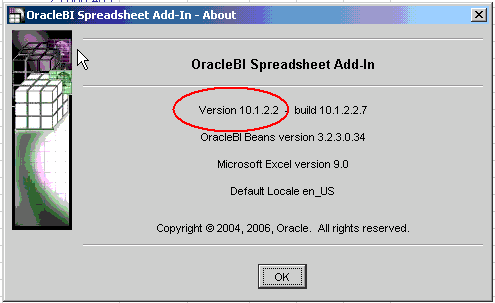 This is the new version of the Oracle BI Spreadsheet Add-In (link to OTN) that is due out shortly. Aneel Shenker, fellow product manager and responsible for the Spreadsheet Add-In, posted a blogpost a while back introducing the new Add-In (link to post).
I finally got round to installing the latest internal build (see screenshot) and playing around with it a bit. The install process is as easy as it was before. Since the Add-In runs on Excel, and since Excecl is available only on Windows, the installer also is a native Windows installer that does its job in less than a minute.
One specific feature I shall look at in this post is the "Rename Query" feature.
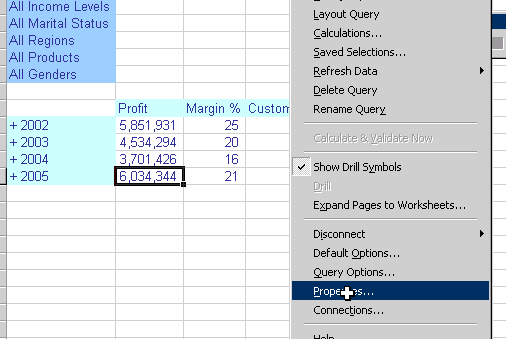
Look at the screenshot of a query I have in Excel that connects to an Oracle Database 10.2.0.2 Analytic Workspace. By default the name given to BI queries in an Excel workbook are "Query n", where 'n' keeps incrementing by 1 whenever you add a new query to the sheet. As you would suspect, lots of scope for making it more usable - especially if you happen to have several queries in your sheet. And that is exactly what we have done in this update.
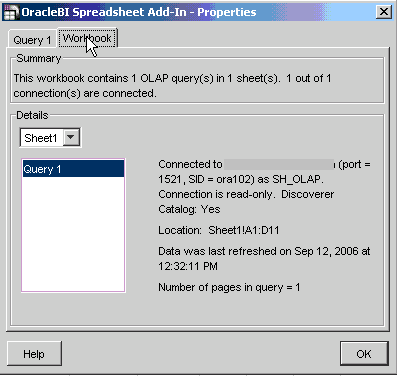 A new menu option has been added to the Add-In menu in Excel, called "Rename Query". So, if you want to rename "Query 1" to something else, like "Yearly Measures", then simply type in the new name, click 'OK' and you are done.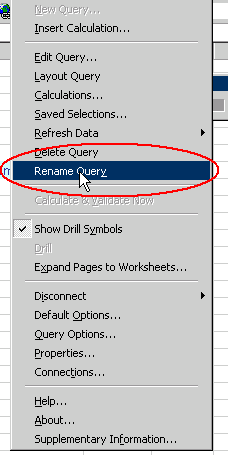
A small dialog pops up that lets you enter in a more user-friendly, descriptive name for the query. In this case I decide to name it "Yearly Measures". Click 'OK' and go back to the AddIn menu dropdown and select "Properties".

To verify that the name change has been effected, click the "Properties" menu option from the Add-In menu, and the new name will be visible.

So, to take this example below, where on a single sheet I have four BI queries, the three that I added later all have the generic name:
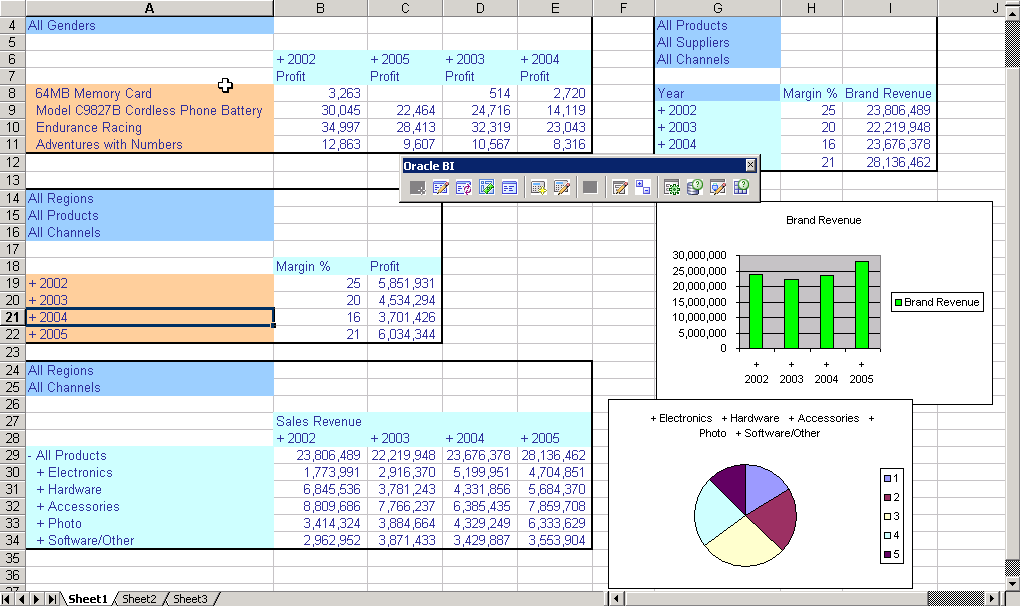
 After renaming the three queries, I now have usable, intuitive names for all my BI queries:
Friday, September 08, 2006
Office - Excel, Word, PowerPoint, Outlook, and more
See Michael's post (link) - if you use any Office applications like Word, Excel, Outlook, PowerPoint, Project, Visio, InfoPath, SharePoint, etc... in the context of viewing business intelligence data - like pulling data from a data mart or data warehouse or even an ODS; if you then embellish it with Excel calculations, or charts, or create Pivot Tables; if you create PowerPoint presentations from the data; if you regularly receive emails containing summarized data or reports - let Michael or myself know. Drop me an email at abhinav.oracle@gmail.com.
And oh yes - if you are interested in and think have what it takes to be a product manager and want to work in Oracle's BI product management group - do let me know (again, drop an email at abhinav.oracle@gmail.com).
Have a great weekend!
And oh yes - if you are interested in and think have what it takes to be a product manager and want to work in Oracle's BI product management group - do let me know (again, drop an email at abhinav.oracle@gmail.com).
Have a great weekend!
Monday, September 04, 2006
Know any product managers?
If you know of people who are qualified and interested in working as product managers for the business intellligence product management group at Oracle, let me know. While I am more interested in a PM specifically here in Bangalore, there is a need for product managers at other locations also - in the UK and in the US. So here is your chance to say "hey - I helped define the best and the #1 BI suite in the market" or "you know that person? I recommended him for that job - the best product management job in the software industry!".
So how do you contact me? Drop me a line at abhinav dot oracle at gmail dot com. If that's too difficult to decipher, try this image: You can find more details about the job at http://irecruitment.oracle.com
Enter the keyword IRC781936 to get to the job posting.
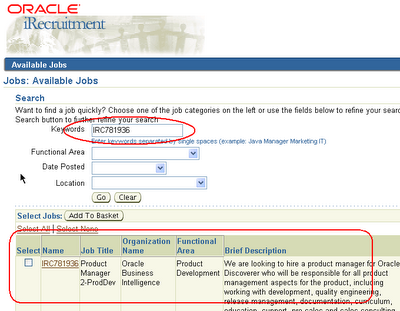
So how do you contact me? Drop me a line at abhinav dot oracle at gmail dot com. If that's too difficult to decipher, try this image:
You can find more details about the job at http://irecruitment.oracle.comEnter the keyword IRC781936 to get to the job posting.

Wednesday, August 30, 2006
Gartner on Oracle and Sigma Dynamics deal
Gartner has a three page news analysis of Oracle's purchase of Sigma Dynamics's assets (link to page on Oracle.com). This is the link to the page on Gartner.com. They have a PDF version of the document available for download. The document is sparse on details, but does give some useful background information to people not famililar with the company or how its product is used in Oracle's Analytics offerings.
From Michael's blog
Michael Armstrong-Smith, Discoverer expert par-excellence, an Oracle ACE, publisher of two hugely popular books on Discoverer, has published the first in a series of posts on how to use third party scheduling tools and products with Discoverer. Here is the link to the first post.
More on OpenWorld and BI
To add a few more sessions of interest (in addition to my previous post) in business intelligence:
Paul Rodwick, vice-president of business intelligence product management, has a session titled "Oracle's Business Intelligence Road Map" (session id S282268). While Chris Leone (also a vice-president of product management, but with the applications strategy group) has a session titled "Oracle Analytic Applications Road Map" (session id S281900).
Matt Elumba has a session titled "Oracle Business Intelligence Suite Enterprise Edition Architectural Overview" (session id S282269).
Specifically to the Maui release (that's the code name for the upcoming release of Oracle BI EE), Dave Granholm has a session titled "What's New in Oracle Business Intelligence Suite Enterprise Edition 10.1.3.2?" (session id S282281).
In the area of OLAP there are at least two sessions that people may be interested in. The first one is by Matt Bedin on "Seamless Access to Your Oracle OLAP Cubes" (session id S282273). The second one is by Bud Endress along with the Gallup Organization, titled "Oracle OLAP Option: How the Gallup Organization Turbocharged Reporting and Analysis" (session id S282385).
And there are many more. Just use this link to get a list of all "analytics" related sessions.
What about me, the curious may ask... I shall not be travelling this year to OpenWorld.
Paul Rodwick, vice-president of business intelligence product management, has a session titled "Oracle's Business Intelligence Road Map" (session id S282268). While Chris Leone (also a vice-president of product management, but with the applications strategy group) has a session titled "Oracle Analytic Applications Road Map" (session id S281900).
Matt Elumba has a session titled "Oracle Business Intelligence Suite Enterprise Edition Architectural Overview" (session id S282269).
Specifically to the Maui release (that's the code name for the upcoming release of Oracle BI EE), Dave Granholm has a session titled "What's New in Oracle Business Intelligence Suite Enterprise Edition 10.1.3.2?" (session id S282281).
In the area of OLAP there are at least two sessions that people may be interested in. The first one is by Matt Bedin on "Seamless Access to Your Oracle OLAP Cubes" (session id S282273). The second one is by Bud Endress along with the Gallup Organization, titled "Oracle OLAP Option: How the Gallup Organization Turbocharged Reporting and Analysis" (session id S282385).
And there are many more. Just use this link to get a list of all "analytics" related sessions.
What about me, the curious may ask... I shall not be travelling this year to OpenWorld.
Tuesday, August 29, 2006
Oracle Open World and BI
 This is a brief post on the different BI sessions at this year's Oracle Open World at San Francisco.
BTW, you can and should use the schedule builder to build a schedule that suits you (link to page on Oracle.com)
- There is an "Extreme Program" titled "Business Intelligence Data Warehousing: Next-Generation Business Intelligence for Actionable Insight to Everyone in the Enterprise, Part 1 & II." It boasts a glittering array of stars from our BI product management, including Aydin Gencler, Kasturi Shekhar, Kurt Wolff, Dave Granholm, Matt Bedin, Krishnan Viswanathan, Mike Reller, Chad Frank, Dan Hilldale, Jim Sarokin, and others. If you haven't, register for X-Treme (link).
- "Best Practices for Implementing Oracle Business Intelligence Suite Enterprise Edition" (session ID S282275).
- "Best Practices for Implementing Siebel Business Analytics" (session ID S282028).
As you may have heard, the upcoming release of Oracle Business Intelligence (code named "Maui" - for exotic honeymoon locations) will provide direct access to SAP BW InfoCubes. Alan Lee has a session titled "Get More Value from SAP BW with Oracle Business Intelligence Suite Enterprise Edition" (session ID S282279).
Oracle recently that it has acquired the intellectual property assets of Sigma Dynamics (link). Stefan Schmitz has a session "Enabling More-Intelligent and Profitable Customer Interactions, Using Oracle Business Intelligence Real-Time Decisions" (session ID S282062) where you would be able to see the product and the technology in action.
Phil Bates shall be talking about the integration between Oracle BI and Oracle BPEL in a session titled "Using Embedded Business Intelligence Within Operational Applications" (session ID S282277). This integration, btw, is also one of the many new features in the upcoming release of Oracle Business Intelligence Enterprise Edition suite.
Tuesday, August 01, 2006
BI/DW Training at OpenWorld 2006

The Oracle OpenWorld conference is being held, as usual, in San Francisco from Oct 22-26. This year's conference is shaping up to be a very big event with even more activities than last year.
As always there will be hands-on labs. However, this year they have all been brought together under the banner of "XTreme Weekend". This year the labs will be a lot more intense than in previous years and are intended to give delegates as much hands-on time as possible. For example for Warehouse Builder we will be providing a whole day of exercises that work through many of the new features we have added to 10g Release 2. For users more interested in reporting, this will be an excellent opportunity to get some quality time with the new BI Enterprise Edition suite of products. Full details of both tracks are below.
The labs will be staffed by product management, developers, and experienced sales consultants. So this is a great opportunity to get free advice and guidance as well as learn about the products. There will be two BI/DW tracks spread over two days (Saturday 21 and Sunday 22). There are only 75 seats available for each track and both tracks are filling up very rapidly and registration is on a first come, first served basis. Register today to attend the X-Treme program to avoid disappointment
- Oracle OpenWorld attendees: Register now for the X-Treme Weekend program for the discounted rate of $650. Register now.
- Non-Oracle OpenWorld attendees: $950. Register now.
The full details of the two BI/DW tracks are as follows:
The Leading, End-to-end Data-Warehousing Platform with Enterprise ETL, OLAP, and Data Mining Capabilities
The Oracle Database is the best platform for supporting your business intelligence applications. Oracle provides an industry leading ETL (extract, transform, and load) tool, deeply integrated OLAP capabilities, and sophisticated data mining capabilities. Join us for deep-dive BI and DW hands-on workshops that you won't find on the regular OpenWorld agenda. Here you'll learn directly from Oracle experts in the following areas:
- How to design, deploy, and manage a feature rich data warehouse environment using Oracle Warehouse Builder
- How to deliver rapid query-response times and sophisticated analysis with Oracle OLAP
- How to incorporate predictive analytics and advanced data-mining techniques into your business intelligence infrastructure with Oracle Data Mining
Next Generation Business Intelligence for Actionable Insight to Everyone in the Enterprise
In this session, you will learn how end users can construct their own queries and build their own dashboards using Oracle BI Suite Enterprise Edition. Oracle BI Suite EE lets you empower employees at all levels with the information they need to make better business decisions easily and efficiently by creating reports, charts, and performance management dashboards through drag-and-drop interface in a completely self-service, Web-based environment. Oracle BI Suite EE lets you collaborate and share business insight through email, and schedule and deliver your reports to dashboards or even wireless devices. You will also have hands-on experience in administrative tasks for defining the physical, logical, and presentation layers to define how end users will interact with the data using business terms. In this hands-on lab, you will learn how to use the components of Oracle BI EE, including Oracle BI Answers, BI Dashboards, BI Advanced Reporting, BI Delivers, and BI Server Administration. Join us for deep-dive BI hands-on workshops that you won't find on the regular OpenWorld agenda.
For a list of all the XTreme Weekend tracks (Database, Fusion Middleware, Apps) click here to go to the Oracle OpenWorld XTreme Weekend site.
Friday, July 28, 2006
OracleBI Spreadsheet Add-in advantages
Thanks for the introduction Abhinav...:)
I will start out with highlighting some of the advantages of using the OracleBI Spreadsheet Add-in. They might not all be quite obvious, but you will appreciate them when you use the product.
Ease of use.
- It installs really easily. Just run the .exe file, walk through the wizard and you are done. Start Excel, and you will see the OracleBI menu.
- We have tried to make the product intuitive to use, so the user can use familiar Excel functions. More on this below.
Formatting and printing.
- You have finegrained control over the appearance of the data. Essentially, you have full control over the format for each individual cell, as you do in Excel
- You can move the Query area around within the sheet using cut/paste, to make space for Charts, formulas etc.
- You can then print the worksheet as a nicely formatted report. Although you don't have pixel perfect control, it is good enough for most purposes, and you still have live, refreshable data.
Extended analysis.
- Add Excel formulas into the Query area just by inserting rows and columns. The add-in will preserve the formulas even when drilling, provided that the cell references are still there.
- You can create formulas that combine data from OLAP with data from other sheets, which could be external data. This is not possible with the built-in Calculation Wizard.
- On the other hand, the Calcuation Wizard enables you to create easily calculations such as 'Variance from Last year' without the need for downloading last years data to Excel first. The calculation runs in the OLAP Server where the data is stored, making this possible.
Using VBA.
- The data is written into the Excel cells, just as if you typed it in, so if you have VBA skills, you can perform additional processing of data by looping through the cells, comparing with other data, creating charts of the data etc. We have added support for some new VBA calls in the upcoming release that will help you with this type of thing.
Multiple queries and databases.
- It is possible to create multiple queries in a Worksheet, and even multiple queries against multiple databases in a workbook. This is a quite unique feature.
- In the new release there is be a Refresh Workbook/ Refresh Worksheet feature to make it easier to reconnect multiple queries. If there are multiple connections, the login dialog will be displayed as needed.
Write-back to Oracle OLAP cubes.
- Write-back has been added in the upcoming release. The OracleBI Spreadsheet Add-in is currently the only Oracle product that does this, short of building your own java application with BI Beans and JDeveloper. This is not trivial, as there are lots of things you have to take into account in designing your cubes and your workbooks, but this is a major feature.
Friday, July 14, 2006
And a new BI blogger
I am very happy to announce that very soon we shall have another Oracle BI product manager start posting on the Orale BI blog. Aneel Shenker is a product manager based out of Oracle's Burlington development center and is responsible among other things for the BI Spreadsheet Add-In. The latest release of the Spreadsheet Add-In, just round the corner, features some cool enhancements that you shall be reading about from Aneel himself. Here's welcoming Aneel!
Row Banding in Oracle Answers
Row banding is something that is used frequently to help make multi-row data more readable. That is a truism.
Oracle Answers (part of Oracle Business Intelligence Enterprise Edition) has support for row banding.
Here's a quick example:
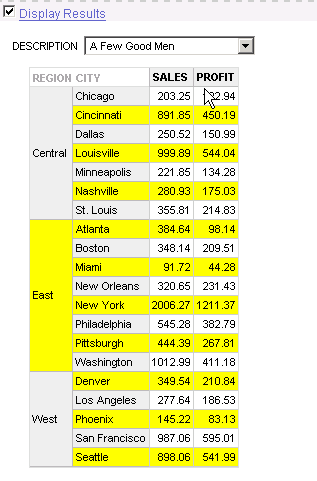
This is a crosstab (called "Pivot Table" in Answers) built on the Video Stores schema. Here the report is grouped by "Region", and the measures are "Sales" and "Profit". "City" is the other item. The report is paged by "Product Description".
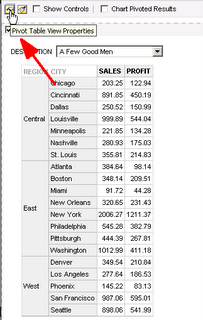 By default this check box is checked off. But I can check it on to enable banding. The default color here is "green bar", and the alternate banding applies only to the innermost columns. Simply speaking this means that it will apply to the non grouped items.
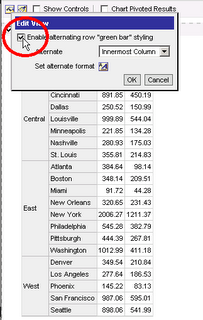 This should make it clearer. Region is not banded as it is a grouped item. City, Sales, and Profit are.
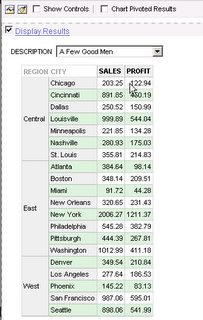
If I now choose the "All Columns" option from the dropdown, the banding applied is as shown below.
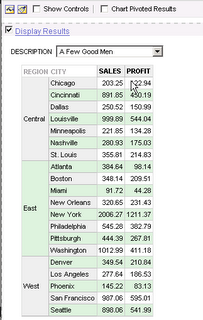
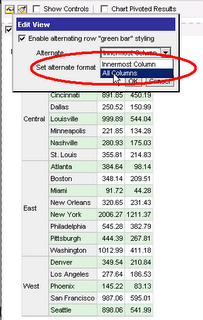 As you can see, even the Region column is now included in the alternate row banding.
 Not that I am restricted only to the light green color. I can go and set an alternate format. I select a bright yellow (would this be canary yellow? probably not... let's call it bright yellow)
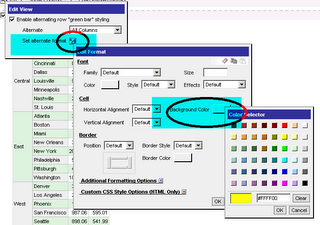
Voila - here is my color banding in yellow now. Bright yellow at that.
Oracle Answers (part of Oracle Business Intelligence Enterprise Edition) has support for row banding.
Here's a quick example:
This is a crosstab (called "Pivot Table" in Answers) built on the Video Stores schema. Here the report is grouped by "Region", and the measures are "Sales" and "Profit". "City" is the other item. The report is paged by "Product Description".
 By default this check box is checked off. But I can check it on to enable banding. The default color here is "green bar", and the alternate banding applies only to the innermost columns. Simply speaking this means that it will apply to the non grouped items.
 This should make it clearer. Region is not banded as it is a grouped item. City, Sales, and Profit are.
If I now choose the "All Columns" option from the dropdown, the banding applied is as shown below.
 As you can see, even the Region column is now included in the alternate row banding.
 Not that I am restricted only to the light green color. I can go and set an alternate format. I select a bright yellow (would this be canary yellow? probably not... let's call it bright yellow)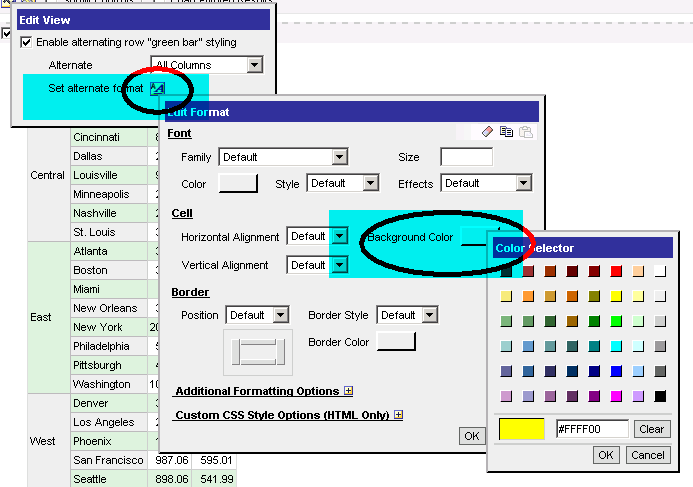
Voila - here is my color banding in yellow now. Bright yellow at that.

Free OWB and DM Review seminar
Too embarassed to even explain why I have not blogged for almost a month... If I say there has been a lot of work, does it mean that BI blogging is not work? Or if I say I have been lazy, does it mean that I have been lazy in general, at work also? Let's just say that blogging is going to be a bit slow in the coming weeks till some things are sorted out and I get a better handle on some new projects I am taking on.
Oracle Warehouse Builder 10g release 2 (link to product page on OTN) released last month, and DM Review is conducting a free web seminar (sponsored by Oracle) on OWB titled "Moving Beyond ETL with Oracle Warehouse Builder: Providing Data Integration and Data Quality". It will be held on Wednesday, July 26th, 2006, at 2:00 p.m. ET / 11:00 a.m. PT. It shall feature Mary Jo Nott from DM Review and Paul Narth from OWB product management.
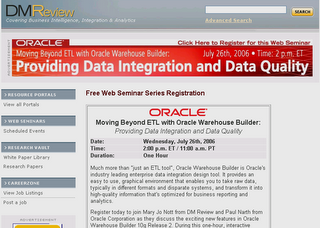
The link to the registration page: http://www.dmreview.com/web/reg_oracle0306.cfm
Oracle Warehouse Builder 10g release 2 (link to product page on OTN) released last month, and DM Review is conducting a free web seminar (sponsored by Oracle) on OWB titled "Moving Beyond ETL with Oracle Warehouse Builder: Providing Data Integration and Data Quality". It will be held on Wednesday, July 26th, 2006, at 2:00 p.m. ET / 11:00 a.m. PT. It shall feature Mary Jo Nott from DM Review and Paul Narth from OWB product management.

The link to the registration page: http://www.dmreview.com/web/reg_oracle0306.cfm
Subscribe to:
Posts (Atom)