OLAP Workshop Part 2 : Understanding OLAP Technology
In the last posting I hopefully explained some of the basic concepts behind OLAP. In this posting I want to explore how those basic concepts are exposed by the various OLAP aware ETL and reporting tools provided by Oracle and other BI vendors.
Architecture of Oracle OLAP
For a long time now Oracle has been unique in the marketplace. With Oracle Database 9i, 10g and 11g, all data (relational and multidimensional) is stored in one Oracle database. Only Oracle OLAP provides native multidimensional data types within the database.
A high-level architectural view of the Oracle OLAP option contains three parts:
Oracle Database 10g OLAP option, which comprises:
- Multidimensional data types
- OLAP calculation engine
- Open-access interfaces
End-user tools, which provide access to OLAP data for a wide spectrum of analytic needs
Administrative tools used to create and manage multidimensional data types. Oracle provides two administrative tools that can be used to create multidimensional data types in Oracle Database 10g:
- Oracle Warehouse Builder
- Analytic Workspace Manager
The following sections examine these three layers in more detail.
Components of Oracle OLAP
With the Oracle OLAP option, you get two powerful arenas of functionality:
- OLAP API and the analytic workspace (AW).
- OLAP API Functionality
 Analytic Workspace
 The Analytic Workspace is the container for the multidimensional data types and leverages the multidimensional calculation engine of the OLAP Option. The AW also provides a standard SQL interface to the multi-dimensional model. This provides an industry standard access layer that can be used by any BI reporting tool that generates SQL commands, from SQL Developer, to Application Express on to more sophisticated tools such as BI EE.
The AW also povides an XML API for administration, and a programming language (OLAP DML).
Multidimensional Data Store The OLAP option provides true array-based multidimensional data types within the Oracle database. These multidimensional data types are contained in special tables in Oracle called analytic workspaces. Some data types are used to store data, whereas others are calculated instantaneously using the multidimensional engine.
Multidimensional Calculation Engine The OLAP Option’s multidimensional engine includes an impressive library of multidimensional-aware calculation functions and support for planning functionalities such as statistical forecasts, models, allocations, projections, and “what-if”scenarios, in the context of Analytic Workspaces. The multidimensional engine interacts with the multidimensional data types in the analytic workspace in the Oracle database.
The Oracle OLAP option provides a specialized Java API that developers can use to exploit the full power of the Oracle OLAP option by using advanced dimensionally-aware tools and applications. This API is used by Oracle Business Intelligence tools such as OracleBI Beans, OracleBI Discoverer, OracleBI Spreadsheet Add-In, and Oracle Reports OLAP Plug-in to provide a true multi-dimensional query and calculation environment.
OLAP DML The OLAP DML is an extremely powerful and analytically rich feature of the AW. It is a dimensionally-aware, high-level procedural language that runs in the database and exploits the multidimensional engine and multidimensional data types.
With the Oracle OLAP option developers can exploit the OLAP DML to add more sophisticated calculations and analysis to AWs and to extend the functionality of applications that access them. The OLAP DML is briefly introduced in the lesson titled “Previewing Advanced Oracle OLAP Features.”
AW API The AW API is a Java API that is used to define and physically build multidimensional analytic workspaces inside Oracle Database 10g. The AW API is used by administrative tools such as Analytic Workspace Manager and may be used by developers, if required, to enhance and extend analytic workspaces as necessary for a specific application.
Query Access to Oracle OLAP
Different users with different end-user tool requirements can all access the same data, taking advantage of the same calculations, and benefit from the same security, scalability, performance, and availability of the Oracle database.
 OLAP API
 The OLAP API is designed to work with both multidimensional data types and relational data types in the Oracle database.
- The API enables you to directly access multidimensional data types in the AW.
- To access relational data types, you can register a relational physical dimensional model (such as a star or snowflake schema) to the Oracle Database OLAP Catalog.
Therefore, tools that use the OLAP API can be deployed against multidimensional analytic workspaces or suitable relational schemas that are registered to the Oracle OLAP option’s metadata layer.
Many Oracle source business intelligence tools take full advantage of the multidimensional query data model provided by the Oracle OLAP option through the OLAP API. These include OracleBI Spreadsheet Add-In, OracleBI Discoverer, OracleBI Beans, and OracleBI Reports.
SQL Interface
Unlike other multidimensional OLAP server products, Oracle OLAP provides not only a specialized API but also industry-standard SQL to access multidimensional data types.
You can use a simple SQL query with relationally oriented tools and applications to gain access to the multidimensional data types in the Oracle database. As a result, your SQL-based applications (such as report generators and ad hoc query tools) can access multidimensional data and calculations managed by the Oracle OLAP option.
SQL and PL/SQL are also used to manage and maintain multidimensional analytic workspaces and to move data between relational and multidimensional data types within the Oracle database.
For example, Oracle Application Express is an easy-to-use tool that is supplied with Oracle Database 10g for Web access to the Oracle database. Oracle Application Express is an example of a SQL-based application with no built-in OLAP knowledge that can nevertheless leverage the power of Oracle OLAP.
Many third-party tools from independent software vendors and Oracle partners, such as Arcplan, Business Objects, Cognos, and a large and growing number of business intelligence vendors throughout the world, access OLAP data through the Oracle OLAP option. Some of these vendors’ tools leverage the OLAP API, whereas others exploit the SQL query interface.
Dimensionally Aware ProductsOracle BI Spreadsheet Addin OracleBI Spreadsheet Add-In makes it easy to access OLAP data through the familiar spreadsheet environment of Microsoft Excel. After installation of OracleBI Spreadsheet Add-In, “OracleBI” appears as a new menu item in Excel. By using OracleBI Spreadsheet Add-In, you can establish a secure connection to the OLAP data source and use Excel as the front-end access tool to the data in the database.
Here are some of the features of OracleBI Spreadsheet Add-In:
- It combines the flexibility and familiarity of Excel and the power, scalability, and security of the Oracle OLAP option.
- OracleBI Query and Calculation Builders: After the connection is established, you can use the wizard-driven interface to drill, pivot, page through large cubes, and create reports.
- Access to native Excel features
- Powerful data-formatting features of Excel,
- Combine Oracle OLAP data with other Excel data
- Write Excel macros that leverage all your data.
- Create formulas and graphs in Excel
Excel users can quickly and easily combine the powerful analytic capabilities of Oracle OLAP with standard Excel functions that you know and use each day.

When using Excel OLAP calculations are performed directly in the database: The benefit of using OracleBI Spreadsheet Add-In is that you no longer need to download massive amounts of data to your spreadsheet. Oracle Database 10g OLAP performs all the OLAP calculations quickly and efficiently in the database. The calculations and business logic are defined only once in the database and then shared across the user community.
For more information goto the Spreadsheet Addin home page on OTN:
Spreadsheet Addin OTN Home Page
http://www.oracle.com/technology/products/bi/spreadsheet_addin/index.html
OracleBI Spreadsheet Add-In Feature Overview
http://www.oracle.com/technology/products/bi/spreadsheet_addin/htdocs/feature_overview/oraclebi_spreadsheet_addin_fov.htm
Introduction to OracleBI Spreadsheet Add-In
http://www.oracle.com/technology/products/bi/spreadsheet_addin/viewlets/olapsa_welcome_viewlet_swf.html
OracleBI Discoverer This is another Oracle Business Intelligence tool that can directly access Oracle OLAP data. Discoverer Plus OLAP is an ad hoc query, reporting, analysis, and Web-publishing tool. It enables you to:
- Perform OLAP query, reporting, and analysis on both multidimensional data models (analytic workspaces) and relational OLAP data models (star or snowflake schemas).
- Access and analyze multidimensional data from your company’s database without having to understand complex database concepts. The wizards and menus of Discoverer Plus OLAP guide you through the steps to retrieve and analyze multidimensional data.
Because Discoverer Plus OLAP understands the dimensional data model, you formulate your queries in the language of business — you use real dimensions, hierarchies, levels, and measures through a simple interface. You can also exploit the rich features of OLAP through dimensionally-aware query and calculation builders, thereby simplifying the tasks of defining queries and calculations. Worksheets that are authored in Discoverer Plus OLAP are published to the Web, where Discoverer Viewer and Oracle Portal users can access them.

For more information goto the Discoverer home page on OTN:
Discoverer OTN Home Page
http://www.oracle.com/technology/products/discoverer/index.html
Creating OLAP worksheets
http://www.oracle.com/technology/products/discoverer/files/viewlets/1012_plus_olap_creating.htmlModifying OLAP worksheet properties
http://www.oracle.com/technology/products/discoverer/files/viewlets/1012_Plus_OLAP_Modifying.htmlOracleBI BeansOracleBI Beans is used by business intelligence and OLAP developers. OracleBI Beans is used for developing applications such as Oracle Enterprise Planning and Budgeting and tools such as OracleBI Discoverer and OracleBI Spreadsheet Add-In. BI Beans is also available to third-party software developers to accelerate development of custom OLAP applications.

BI Beans is a set of standards-based Java beans that is integrated into Oracle JDeveloper. It provides analysis-aware application building blocks designed for the Oracle OLAP option of the Oracle database. Using BI Beans, you can create customized business intelligence applications that take advantage of the robust analytic capabilities of Oracle OLAP.
Applications can include advanced features such as interactive user interfaces, drill-to-detail reports, forecasting, and what-if analysis. BI Beans includes Java beans for acquiring data from the Oracle database, presenting data in a variety of crosstab and graph formats, and saving report definitions, custom measures, and data selections.
Using BI Beans, you can develop business intelligence applications from Oracle JDeveloper, or any Java application development environment, and deploy them through any application server as a thin or thick client.
For more information goto the BI Beans home page on OTN:
BI Beans OTN Home Page
http://www.oracle.com/technology/products/bib/index.htmlOracle BI Beans Feature Overview
http://www.oracle.com/technology/products/bib/1012/htdocs/feature_overview/BI_Beans_Feat_Oview.htm
Developing a Dashboard Application with Oracle BI Beans
http://www.oracle.com/technology/products/bib/1012/viewlets/MS Developing Executive Insight.htmlSQL Aware ProductsOracle Business Intelligence EE
Oracle Business Intelligence Suite Enterprise Edition 10g, Release 3 (BI EE 10g ) delivers significant new product enhancements to further enable enterprise-wide BI, including integration with Oracle OLAP. In this release, Oracle's native multidimensional data model -- the analytic workspace (AW) -- is made accessible to BI EE 10g by creating the required metadata in Oracle BI Administration Tool. The AW data is exposed to the BI EE 10g product stack, and the OLAP engine is leveraged for analysis of that data.
Creating access to Oracle OLAP data is a simple 3-step process. Each these steps is covered in detail as part of an training document provided as an Oracle by Example. This explains how to: prepare an AW for access by BI EE 10g; create the required metadata using Oracle BI Administration Tool; and create analytic reports of AW data using Oracle BI Answers

For more information goto the BI EE home page on OTN:
BI EE OTN Home Page
http://www.oracle.com/technology/products/bi/enterprise-edition.html
Ad-hoc query and reporting
http://www.oracle.com/technology/products/bi/enterprise-edition-platform-components.html
Oracle By Example:
These lessons are designed for completion in the order that is shown below. Each subsequent lesson depends on the completion of the previous lesson. Click on any of the links below to begin.
Lesson 1: Preparing an Analytic Workspace for Access by Oracle BI EE 10g
http://www.oracle.com/technology/obe/obe_bi/bi_ee_1013/olap/PrepareAW.htm
Lesson 2: Creating BI EE 10g Metadata for the Analytic Workspace
http://www.oracle.com/technology/obe/obe_bi/bi_ee_1013/olap/CreateMetadata.htm
Lesson 3: Querying OLAP Data Using Oracle BI Answers
http://www.oracle.com/technology/obe/obe_bi/bi_ee_1013/olap/QueryData.htm
Oracle Application ExpressThe Oracle OLAP option provides a SQL interface to access multidimensional data types, thus enabling any SQL-aware tool to access data in the analytic workspace.
Oracle Application Express is an easy-to-use report builder that is provided with Oracle Database 10g to simplify the creation of database-centric interactive Web pages.
Thus, with the Oracle OLAP option, you can use Oracle Application Express to provide Web-based access to key performance indicators such as profitability, sales, units shipped, trends, and period-to-period comparisons and forecasts.
It provides support for some interactive reporting (for example, you can use hypertext links to call more SQL queries), but it is not a fully interactive analysis system like OracleBI Discoverer or like other specialized business intelligence tools.
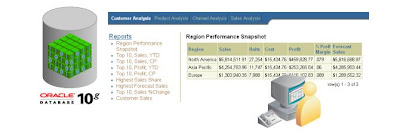
The Web report in the slide is generated with the following SQL code:
SELECT region_desc, sales, units, cost, profit,
ROUND(pct_margin ,3), fcast_sales
FROM mysalesaw_view
WHERE time_desc = TO_CHAR(ADD_MONTHS(SYSDATE,-3), 'Mon-YY')
AND product_level = ‘ALL'
AND channel_level = ‘ALL'
AND customer_level= 'REGION'
ORDER BY sales DESC;
Because the multidimensional data model presents data to the query layer as if it were precalculated, prejoined, and preaggregated, your query does not need to perform any calculations, joins, or aggregations. SQL code is thus very simple to write and fully leverages the power of the AW. The multidimensional engine returns the requested data from the AW extremely efficiently and quickly, even if the AW is calculating much of the data instantaneously.
For more information goto the Application Express home page on OTN:
Application Express OTN Home Page
http://www.oracle.com/technology/products/database/application_express/index.htmlWhat is Oracle APEX?
http://www.oracle.com/technology/products/database/application_express/html/what_is_apex.html3.0 New Features
http://www.oracle.com/technology/products/database/application_express/html/3.0_new_features.html
Tools to Build an Analytic Workspace
Two tools are available for IT and power users to easily build analytic workspaces (AWs) and load them with data (for analysis with tools such as OracleBI Beans, OracleBI Discoverer, and OracleBI Spreadsheet Add-In):
 Shared API for AW Creation
 Both OWB and AWM use the AW XML API to build and maintain AWs. Therefore, an AW model that is created by AWM can be incorporated back into the OWB repository to provide version control, lineage, and impact analysis if changes to the original source systems are required.
Note: Both OWB and AWM generate scripts that may be called and scheduled from PL/SQL scripts or other scheduling processing tools, if required.
Analytic Workspace Manager (AWM) AWM is a tool that makes it easy to build and maintain AWs from a suitable (clean) data source. AWM is used on source data that has been cleaned by the ETL process.
The clean data may have been created by Oracle Warehouse Builder or by another ETL process; your IT department would have a preferred method of preparing data.
AWM is focused on the simple task of building AWs. It has an intuitive wizard-based user interface and is therefore suitable for both IT and power users.
AWM supports the complete process of creating an AW from beginning to end in a single, dimensionally-aware design environment.
The creation process includes three easy steps:
- Design the dimensional model.
- Map the dimensional object to the source data.
- Load the data into the AW.
After you have performed these steps, the AW is immediately available for your tools to query.
For more information goto the OLAP home page on OTN:
OLAP OTN Home Page
http://www.oracle.com/technology/products/bi/olap/olap.html
Analytic Workspace Manager 10.2.0.3.0A
http://www.oracle.com/technology/software/htdocs/devlic.html?url=http://download.oracle.com/otn/java/olap/AWM_102030A_Win32.zip
Analytic Workspace Manager 10g
http://www.oracle.com/technology/products/bi/olap/1451_AWM10g.pdf
Improve SQL Based Business Intelligence Tools with Oracle OLAP 11g
http://www.oracle.com/technology/products/bi/olap/Oracle_OLAP_11g_TWP.pdf
Leveraging Business Intelligence Tools
http://www.oracle.com/technology/products/bi/olap/40261_leveragingtools.pdf
Analytic Workspace Manager 10.2.0.3.0
http://www.oracle.com/technology/products/bi/olap/viewlet/AWM102_viewlet_swf.html
OracleBI Warehouse Builder 10g R2 (OWB) OWB is an advanced management and ETL tool, used by developers and database administrators to build and manage data warehouses in the Oracle database. OWB manages the entire process of collecting and cleaning data.
- Collecting data: OWB collects data from the various operational systems that feed the data warehouse.
- Cleaning data: OWB performs various required transformations and data-cleansing activities (for example, dealing with inconsistencies between different source systems, matching and merging data from them, and processing missing or erroneous data).
The result is a set of clean tables in the Oracle database.
- OWB includes advanced data-profiling features.
- OWB enables data warehouse developers to optionally populate relational star or snowflake schemas or multidimensional AWs for access by the Oracle OLAP option.
- OWB is, therefore, a professional IT tool.
Warehouse Builder is free to database customers and this free functionality includes deploying OLAP schemas. Some Warehouse Builder features are costed options and these include:
- Enterprise ETL
- Data Quality
- CRM/ERP Connectors
For more information goto the Warehouse Builder home page on OTN:
OTN Home Page
http://www.oracle.com/technology/products/warehouse/index.html
Oracle Warehouse Builder 10gR2 and Oracle OLAP
http://www.oracle.com/technology/products/warehouse/pdf/OWB10gR2 and Oracle OLAP.pdf
Benefits of a Multi-dimensional Model
http://www.oracle.com/technology/products/warehouse/pdf/Benefits of a multi-dimensional model.pdf
Summary
In this latest post you should have learned how to describe:
- Oracle OLAP and its components
- The flexibility of (and options for) accessing Oracle OLAP data
- Oracle business intelligence tools and applications that access the analytic workspace in the Oracle database
- Oracle administrative tools that enable building and maintenance of analytic workspaces

 Oracle Business Intelligence: The Condensed Guide to Analysis and Reporting
 . It’s a pity Michael has not yet published an updated version of the book, since there is a lot that has changed in the 11g release with respect to how Discoverer is installed, managed via Oracle Weblogic and the new Enterprise Manager console. Then there is the integration with BI Publisher, the migration utility for migrating your EUL-based Discoverer metadata to the Oracle BI Server RPD-based metadata. There is also a workbook migration utility that is on the product roadmap, as is further integration with the Dashboards product in the Oracle BI Suite Enterprise Edition.


(Paperback)


